Canada

Laptops & notebooks for sale Toronto

Laptops & notebooks for sale Toronto
5 Results
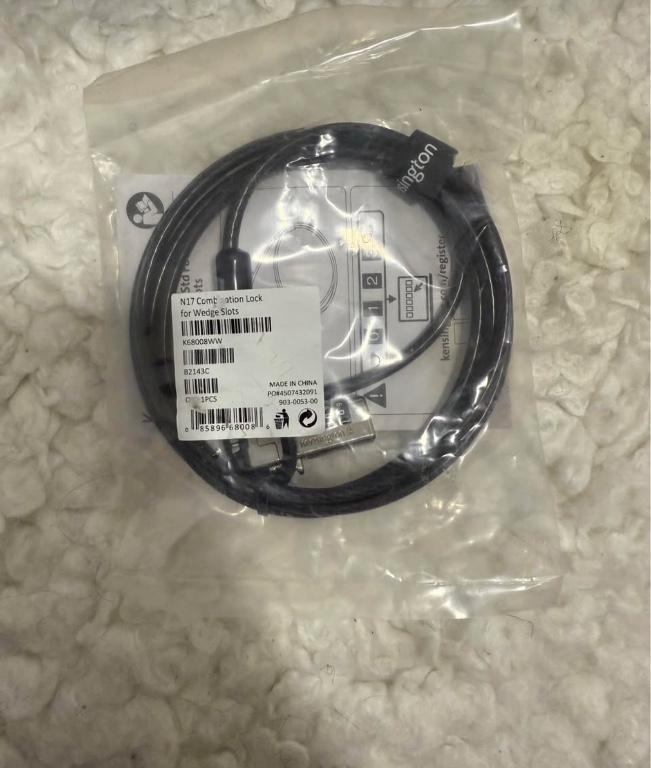
Kensington combination lock, Toronto
Kensington combination lock in Toronto - Image 1 Kensington combination lock in Toronto - Image 1
Kensington combination lock in Toronto - Image 2 Kensington combination lock in Toronto - Image 2
Kensington combination lock in Toronto - Image 3 Kensington combination lock in Toronto - Image 3
1 / 3
3
$30.00
This new Kensington N17 combination lock for wedge slots offers reliable security for your devices. This lock has never been used and is still sealed in its original packaging, ready to provide peace of mind against theft. * **Brand:** Kensington * **Type:** Combination Lock * **Compatibility:** …
HP ProBook 6460B Laptop, i5-2520M,4GB,500GB in Toronto - Image 1 HP ProBook 6460B Laptop, i5-2520M,4GB,500GB in Toronto - Image 1
HP ProBook 6460B Laptop, i5-2520M,4GB,500GB in Toronto - Image 2 HP ProBook 6460B Laptop, i5-2520M,4GB,500GB in Toronto - Image 2
HP ProBook 6460B Laptop, i5-2520M,4GB,500GB in Toronto - Image 3 HP ProBook 6460B Laptop, i5-2520M,4GB,500GB in Toronto - Image 3
HP ProBook 6460B Laptop, i5-2520M,4GB,500GB in Toronto - Image 4 HP ProBook 6460B Laptop, i5-2520M,4GB,500GB in Toronto - Image 4
HP ProBook 6460B Laptop, i5-2520M,4GB,500GB in Toronto - Image 5 HP ProBook 6460B Laptop, i5-2520M,4GB,500GB in Toronto - Image 5
1 / 5
5
$325.00
HP ProBook 6460b Intel Core i5 - 2520M 2.5GHz 500GB 4GB of RAM 14" screen(1366x768) LED-backlit display Bluetooth, Camera/Mics HDMI, multi usb ports DVD-RW Windows Home 54-bit Altec Lansing Speaker HDMI port for presentations .
DELL XSP LAPTOP & TABLET in Toronto - Image 1 DELL XSP LAPTOP & TABLET in Toronto - Image 1
DELL XSP LAPTOP & TABLET in Toronto - Image 2 DELL XSP LAPTOP & TABLET in Toronto - Image 2
1 / 2
2
$900.00
Brand new laptop and touch screen
Lenovo ThinkPad T14 Vpro in Toronto - Image 1 Lenovo ThinkPad T14 Vpro in Toronto - Image 1
Lenovo ThinkPad T14 Vpro in Toronto - Image 2 Lenovo ThinkPad T14 Vpro in Toronto - Image 2
Lenovo ThinkPad T14 Vpro in Toronto - Image 3 Lenovo ThinkPad T14 Vpro in Toronto - Image 3
Lenovo ThinkPad T14 Vpro in Toronto - Image 4 Lenovo ThinkPad T14 Vpro in Toronto - Image 4
Lenovo ThinkPad T14 Vpro in Toronto - Image 5 Lenovo ThinkPad T14 Vpro in Toronto - Image 5
1 / 5
5
$1,300.00
Unheard of deal this state of the art to powerful efficient technological Marvel 2300 plus tax in the store can be yours with savings at close to $1,000 and a free Herschel laptop carrying case 1300$p
$75.00
I am looking to buy an used Lenovo Thinkpad W530 that I can use for parts. Please contact me if you have on that you no longer need.

Laptops & notebooks for sale in Multimedia Toronto

On the hunt for a new laptop? Browse through a range of new and secondhand laptops in the Toronto Laptops, Notebooks & Accessories category. You can shop by brand, and find accompanying accessories like laptop cases, chargers, sleeves and docking stations. If you’re choosing a new laptop or notebook, make sure you pick one that is suitable for your needs.

Laptop Buying Guide: How to choose the right laptop for you

  1. Firstly consider your use: How you plan to use your laptop will help determine which features you need and which you don’t. If you just want something to browse the web and stream movies, you can look at cheaper options with larger screen sizes. If you’re a graphic designer you may want a 2-in-1 that easily converts into a touchscreen tablet. For coding, gaming, or other activities that require space, you’ll want to look at laptops with a lot of storage that can handle these programs.
  2. Laptop vs Notebook vs Tablet: While you may think you need a laptop, you should consider all of your options before deciding. Notebooks tend to be sleeker and lighter in weight so they’re more portable. They’re better for entertainment and basic purposes like writing emails and surfing the internet. They’re also good for students if you need something to take notes with in class and type up papers at home. Tablets are another great choice for students, as they have a lot of options with add-ons. If you have a tablet with a keyboard and pen, you have a very versatile device. Although cost-wise, Notebooks are usually the cheapest option. iPads can be more expensive than some computers and laptops have a wide range in price depending on their capabilities and the brand.
  3. Operating system: The next thing to think about is what operating system you have a preference for when choosing your new laptop. Windows is a standard operating system, compatible with Microsoft Office Suite, and overall will have everything you need for work or study. Most laptops are compatible with Windows, so you’ll have plenty of options to choose from like Lenovo, Asus, and Dell laptops. On the other hand, MacOS is only available on Apple Macbooks, but if you already have an iPhone or iPad, you may prefer to keep all of your devices aligned. It also has a simple and easy-to-use interface which a lot of people love. If you’re open to an even simpler operating system, the Chrome OS is good if your main purpose is browsing the web or checking social media. It’s more limited than the others, but Chromebooks are cheaper and more portable. If you use Google Drive and prefer to write on Google Docs over Microsoft Word, Chromebooks are a perfect choice for you. You can shop some from well-known brands like Samsung, HP, and Acer.
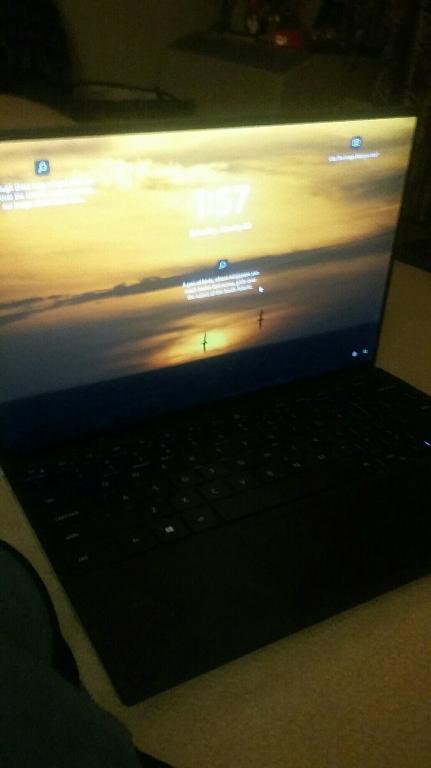
  4. Screen size and weight: Standard laptops usually have a screen size between 13 and 15 inches, which range between 4 to 5.5 pounds in weight. Keep this in mind, if you prefer to have a larger screen with high resolution and graphics, or if you need something lighter that’s suitable to carry everywhere.
  5. Battery life: Unless you plan to be connected to your charger, make sure you check the battery life of a laptop before buying. About 8 hours of battery life is good, so you could do a full day’s work before needing to recharge.

There are many things to consider when purchasing a new laptop, so these are just the basics. Depending on what you need you may also want to investigate options for RAM, storage capacity, processors and more. If you see a listing you’re interested in, the best thing to do is contact the advertiser with any questions you may have, or do some research on the specific laptop to get more information.

If you’re rather in need of a desktop computer, monitor, or other accessories, you may find what you’re looking for in our Computers, Software & Components category. Alternatively, if you’re replacing a device, consider putting up an ad for your older laptop. You can easily make money selling your used electronics on Locanto, and you can help out someone in your local Toronto community looking for a cheap laptop. Post an ad now!